MI MűvekKeeping the machinery well oiled.

Problem solving and automation for businesses

Where does work get stuck? We fix it.

Lost orders, hand-typed invoices, paper timesheets, reports that take half a day. We find where work gets stuck in your business and fix it: with automation, artificial intelligence (AI) or custom software.

Quick diagnosis

Tell us where work gets stuck, and the rating plate shows you which machine fixes it.

MI Művek Automation, small-batch made
Fixes
Lost orders
Product
Order collector automation
Runs itself
Collects, records, invoices, notifies
Replaces
Messenger, e-mail, webshop, phone
Client
Your company · Retail and trade
Type number
MW-10/R-2026

Lubricant: AI · Box: none · Operating voltage: 0 V

MessengerE-mailSpreadsheetPhonePaper and sticky notes
Order recordedInvoice issuedCustomer notifiedReport sent

How it works: from scattered manual work to a process that runs itself.

Sound familiar?

Troubleshooting chart

Typical business problems and how we solve them with process automation, AI solutions or custom software. On the left, the symptom as business owners describe it; next to it, our fix and the result.

Orders and sales

Symptom

Orders come in through Messenger, e-mail and phone. Some get lost.

Our fix

Order collector automation MW-10

Every channel lands in one place; the confirmation and the invoice go out automatically.

Result

One list where nothing gets lost.

Symptom

A quote takes half a day, and no two look the same.

Our fix

Quote automation MW-10

Builds the quote from your own prices and template.

Result

Consistent quotes in minutes.

Symptom

We don't know which quotes are still unanswered.

Our fix

Quote follow-up MW-10

Flags quotes that have been open for days and drafts the follow-up e-mail.

Result

No quote goes without a follow-up.

Finance and administration

Symptom

The first two days of every month go on typing in invoices.

Our fix

Document processor MW-32

AI reads the data from invoices and delivery notes and records it.

Result

Instead of typing, all that's left is checking.

Symptom

Sometimes an invoice is forgotten or goes out days late.

Our fix

Invoicing automation MW-10

Delivery or the order itself automatically raises the invoice in your invoicing software.

Result

No forgotten invoices.

Symptom

We always have to chase who hasn't paid yet.

Our fix

Payment monitor MW-10

Matches incoming transfers to invoices and sends reminders to late payers.

Result

Fewer outstanding invoices, fewer awkward calls.

Symptom

We can't tell how much money we'll have next month.

Our fix

Cash-flow forecaster MW-40

Builds your expected cash flow automatically from issued and received invoices and recurring costs.

Result

You see a cash squeeze coming in advance.

Symptom

We try to work out from paperwork, after the fact, how much each job made.

Our fix

Project cost tracker MW-40

Every invoice, material and labour hour is assigned to the right job as soon as it's recorded.

Result

You can see which jobs made money.

HR and working time

Symptom

Timesheets are on paper, and adding them up takes days at month end.

Our fix

Time tracker MW-50

Clock-in and clock-out by phone or terminal, with overtime, on-call time and monthly totals.

Result

Month-end totals at the push of a button.

Symptom

Leave requests arrive by e-mail, and nobody knows how many days anyone has left.

Our fix

Leave and absence manager MW-50

Online requests, one-click approval, always up-to-date leave balances and a shared team calendar.

Result

Everyone can see their own balance.

Symptom

Every month we send overtime and absences to the payroll provider by hand.

Our fix

Payroll data export MW-50

Working time, overtime and absence data go across in exactly the format your payroll provider asks for.

Result

No retyping, no mistyped overtime.

Symptom

With every new hire something gets missed: the contract, the access card, a login.

Our fix

Onboarding and offboarding MW-50

Every joiner and leaver automatically starts a checklist with owners and deadlines.

Result

A new colleague's first day starts smoothly.

Customer relations

Symptom

Fifty times a day I answer when the parcel will arrive.

Our fix

Customer service assistant MW-31

AI answers from your own data and passes anything it can't handle to a colleague.

Result

Your team spends time on the real cases.

Symptom

If I don't write it on a sticky note, we forget to call the customer back.

Our fix

Follow-up automation MW-10

Every customer request gets an owner and a deadline, and the system sends reminders.

Result

No callback is missed.

Symptom

Booking appointments means days of back-and-forth phone calls.

Our fix

Appointment booking MW-10

Online booking for genuinely free slots, with automatic reminders.

Result

Fewer calls, fewer no-shows.

Operations and management

Symptom

We have three spreadsheets, and each one shows a different number.

Our fix

Custom operations system MW-20

One shared database where everyone sees what they need for their own job.

Result

Everyone sees the same number.

Symptom

Monday morning: half a day to put together the weekly report.

Our fix

Report automation MW-10

The figures assemble themselves from your existing software.

Result

It's in your inbox by Monday morning.

Symptom

Everything has to be explained to new colleagues in person, several times.

Our fix

Company knowledge base MW-33

An AI assistant that answers from your own documents, with sources cited.

Result

Faster onboarding, fewer repeated questions.

Symptom

When the key person is on holiday, work stops.

Our fix

Process automation MW-10

Routine steps move into the system and run without anyone touching them.

Result

The business no longer depends on one person.

Symptom

We pay for software we work around half the time.

Our fix

Custom replacement software MW-20

A system written for your processes, with only what you actually need.

Result

The software adapts to you.

Not everything is worth automating. If it happens twice a year, keep doing it by hand. We'll tell you that too.

Quick estimate

What is this problem costing you now?

Pick an example or enter your own recurring task. The counter assumes 46 working weeks a year and the hourly cost you set. We measure the exact figure during fault diagnosis.

70 %

What it costs you now, every year

184 labour hours, or 23 full working days of manual work.

Of this, automation can win back every year

HUF

What it costs you now: 736,000 HUF a year. Automation can win back 129 labour hours a year, about 516,000 HUF.

Time won back
16 days
Over 5 years
2.6 million HUF

And that doesn't yet include lost orders, late invoices or the time spent fixing mistakes.

The button fills in the quote request with the figures above.

Toolkit

What we fix it with

We start from the problem and pick the tool to match. A single job often uses two or three of them together.

Process automation

MW-10

When you do the same step by hand several times a day.

  • Order, invoice, stock and notification in one chain
  • Data transfer between programs, without copy-paste
  • Reminders, deadlines, customer follow-up
  • Reports that build themselves

Typical resultWhat used to take hours now runs on its own. People only handle the exceptions.
Custom business software

MW-20

When the business runs on spreadsheets, notebooks and half-fitting software.

  • Quote and order management
  • Stock, production and job sheet tracking
  • Customer records and internal portal
  • Integration with the software you already use

Typical resultOne system where everyone sees the same number.

AI solutions

MW-30

When text has to be read, understood or written, over and over, always the same way.

  • Customer service assistant trained on your own material
  • Automatic processing of invoices and contracts
  • Company knowledge base that cites its sources
  • E-mail triage and reply drafts
All six products of the AI Department

Typical resultThe machine does the mechanical text work; people check and decide.

Finance systems

MW-40

When you only see the financial picture at month end, from your accountant.

  • Automatic invoicing and payment monitoring
  • Cash-flow forecast from expected income and expenses
  • Costs and labour hours tracked per job and project
  • Data handover to your accountant, without retyping

Typical resultAn up-to-date financial picture, not just at month end.

HR and time tracking

MW-50

When timesheets are on paper, leave is in a spreadsheet and overtime is in someone's head.

  • Time tracking by phone or terminal
  • Leave and absence management with approvals
  • Monthly summary for payroll
  • Onboarding and offboarding checklists with owners

Typical resultMonth-end totals are ready at the push of a button.

Monitoring and maintenance

MW-60

When it already works and the goal is to keep it that way.

  • Monitoring of automations, with alerts
  • Hosting, backups, updates
  • Troubleshooting
  • Further development as your business changes

Typical resultIf something gets stuck, we know before you do.

Side lineIf your processes need an online shop too, we build that as well, connected to invoicing, payments and parcel lockers.MW-90 · Online shop

Delivered units · References

What we've already built

Working systems we designed and built. The names and jobs shown in the images are fictional.

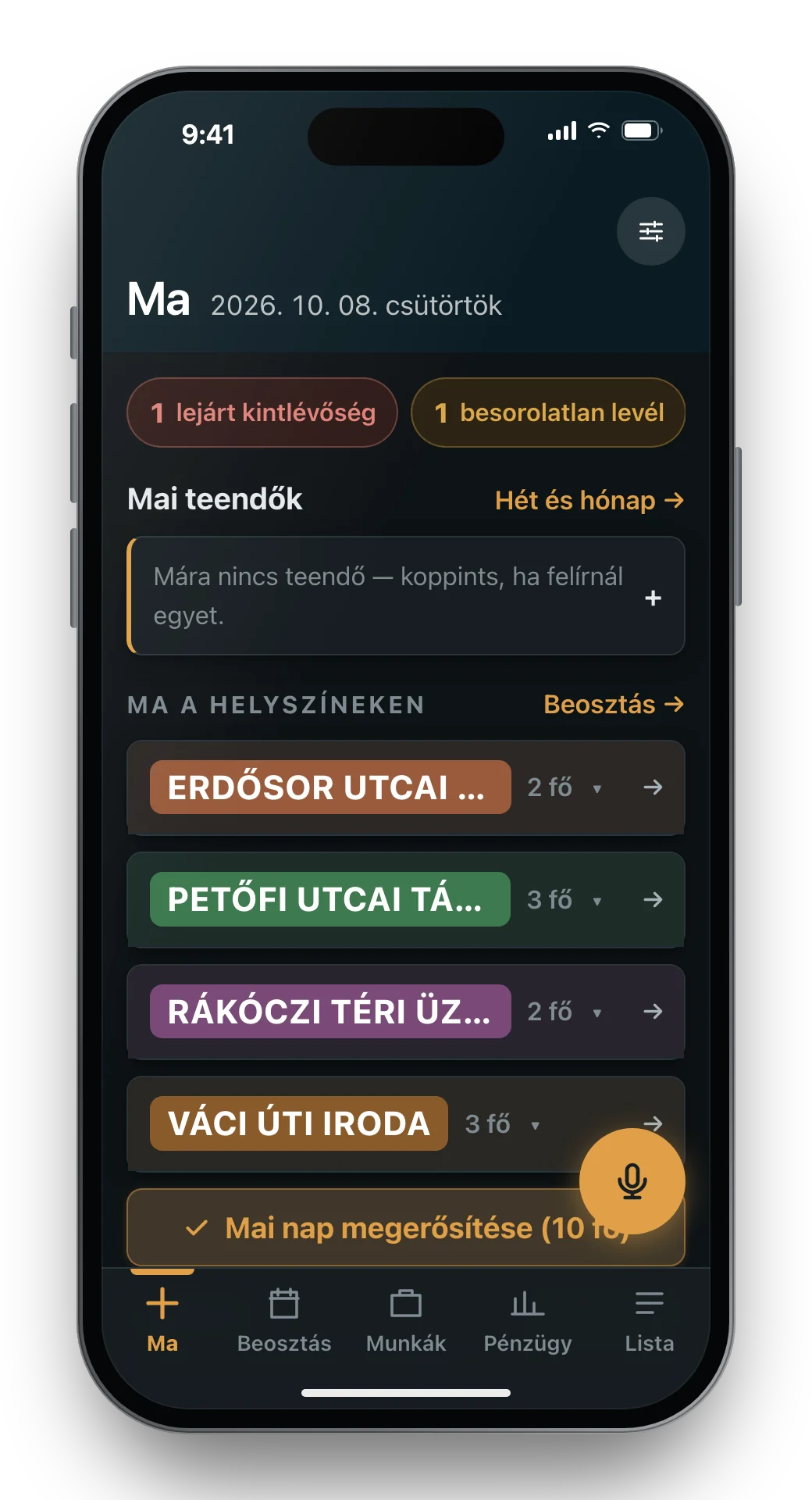
The 'Today' screen of the work management app on a phone: today's sites with the number of people assigned, an overdue receivables alert and the microphone button for voice control.

Voice-driven work management for a construction company

The owner of a 10–14-person tiling, painting and drywall company kept track of who worked where in his head and on paper, and only knew roughly, after the fact, what a job had cost.

We built him a phone-based system he uses by voice during the day, between sites:

  • Daily scheduling and working time, including labour cost
  • Job costing per job: labour, materials, equipment hire, subcontractors
  • Supplier invoices photographed, read by the system and assigned to the right job
  • Receivables, payables and expected VAT on a single screen
  • Dictated notes and shopping lists from the site
Client
Construction contractor, 10–14 people
Area
Working time, finance, job costing
Usage
On the phone, by voice, on the move
Tools
MW-20 · MW-30 · MW-40 · MW-50

Production management for a bespoke furniture maker

At a bespoke furniture workshop, jobs, furniture pieces, subcontractors and supplier orders lived in spreadsheets, e-mails and people's heads.

We built a single web-based system used in the office, in the workshop and on site. From quote to installation, every job, piece, subcontractor and order in one place, with a production kanban on the shop floor.

Extras you usually only get from very expensive production management systems:

  • Supplier automation: orders go out to hardware, board, finishing, glass and stone suppliers in one click. Confirmed prices, order numbers and expected delivery dates are written back automatically, and the system reconciles open orders every day.
  • Direct output to the panel saw: the cutting list is generated straight in the native format of the panel saw's own software, with no retyping.
  • In-house nesting software: it places irregularly shaped CNC parts (DWG/DXF) on the boards with clearance gaps and free-angle rotation, for the least possible waste.
  • Automatically generated schedule: weighted progress for every job, calculated from the status of its phases, with alerts where things need to speed up.
  • And more: tasks from e-mail, a morning deadline digest for everyone, a voice assistant, time export for payroll, and a QR code for every piece of furniture.
Client
Bespoke furniture maker
Users
20+ concurrent users
Area
Production, purchasing, subcontractors, scheduling
Tools
MW-10 · MW-20 · MW-30 · MW-50
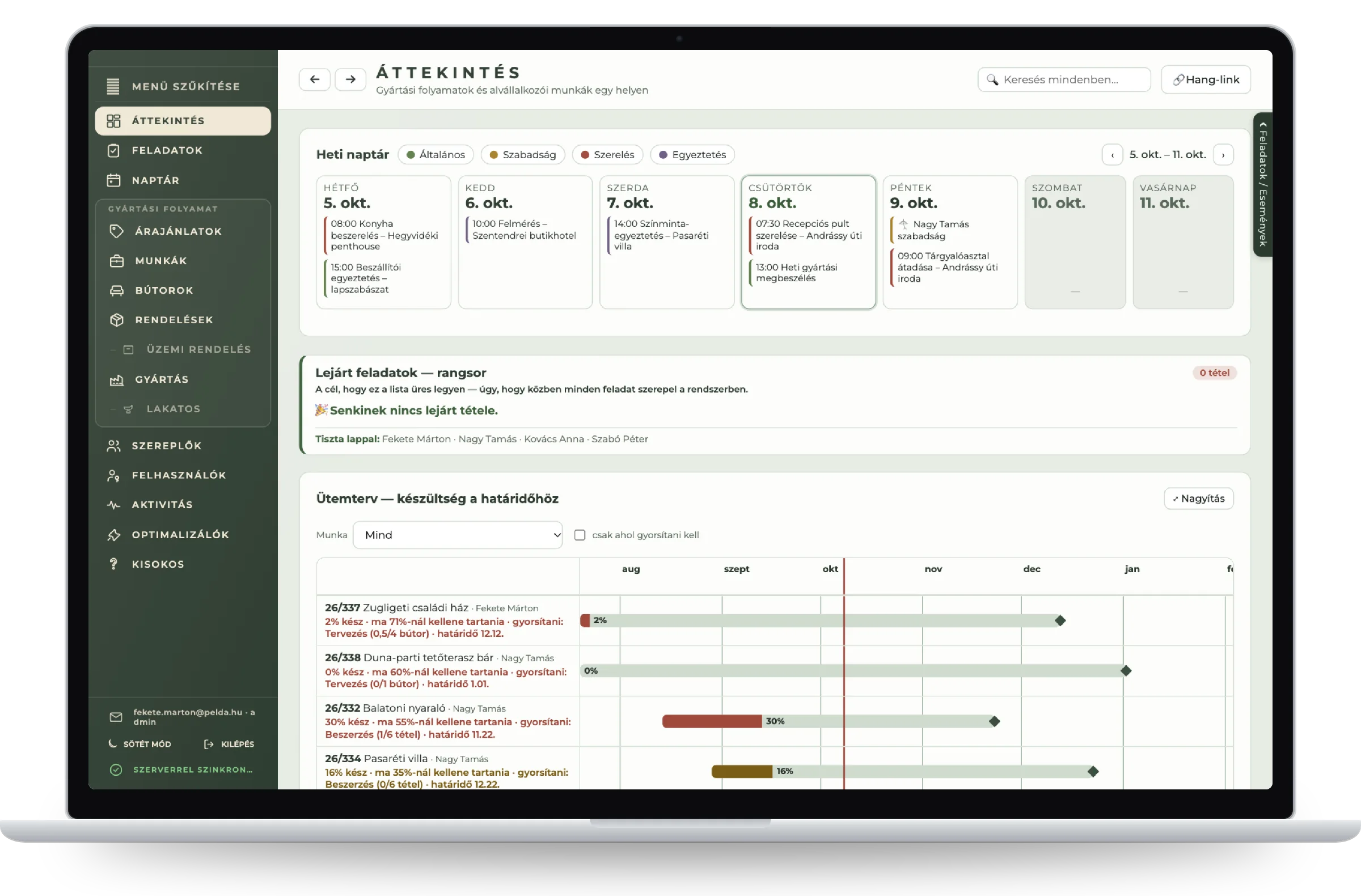
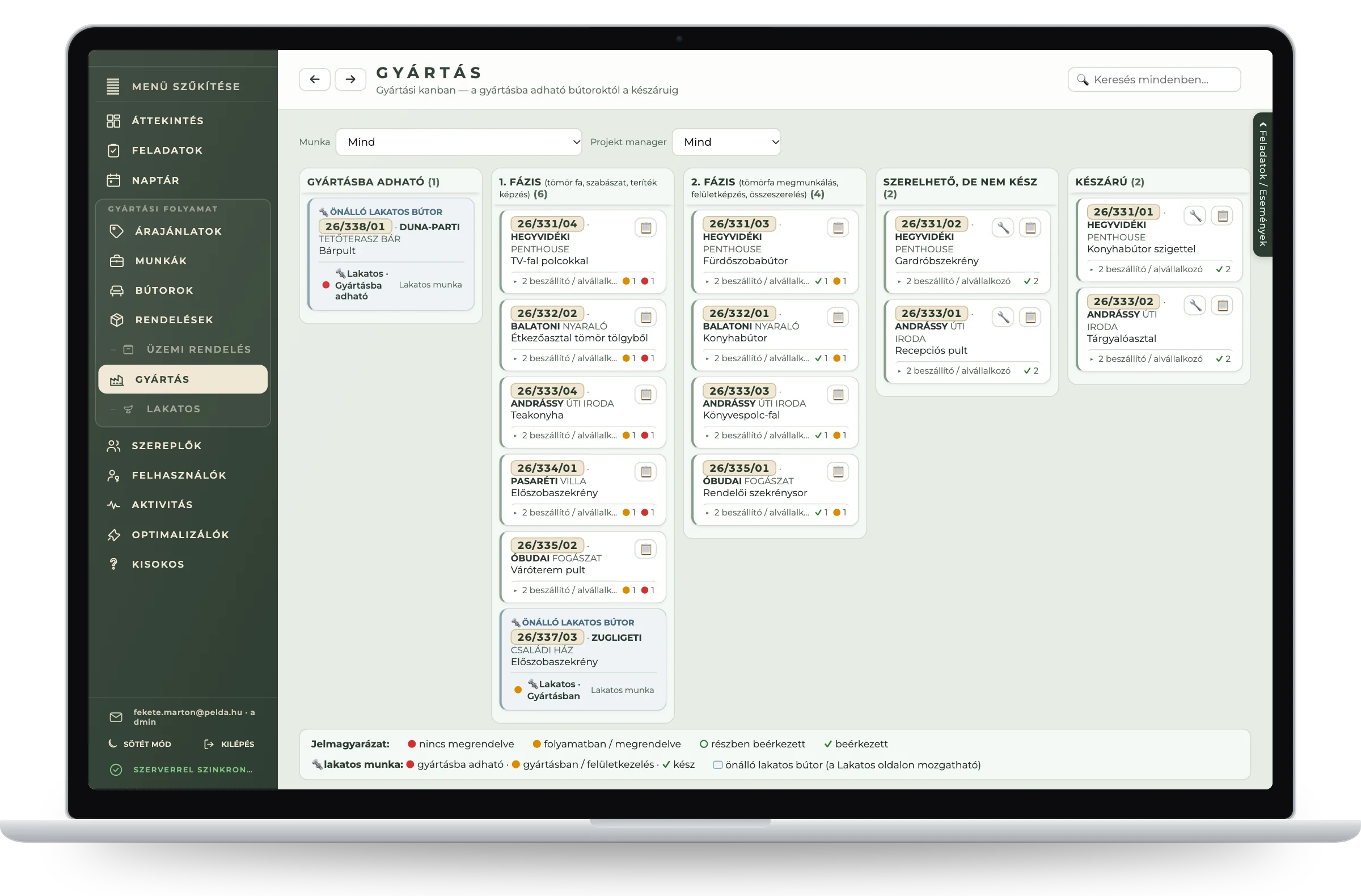
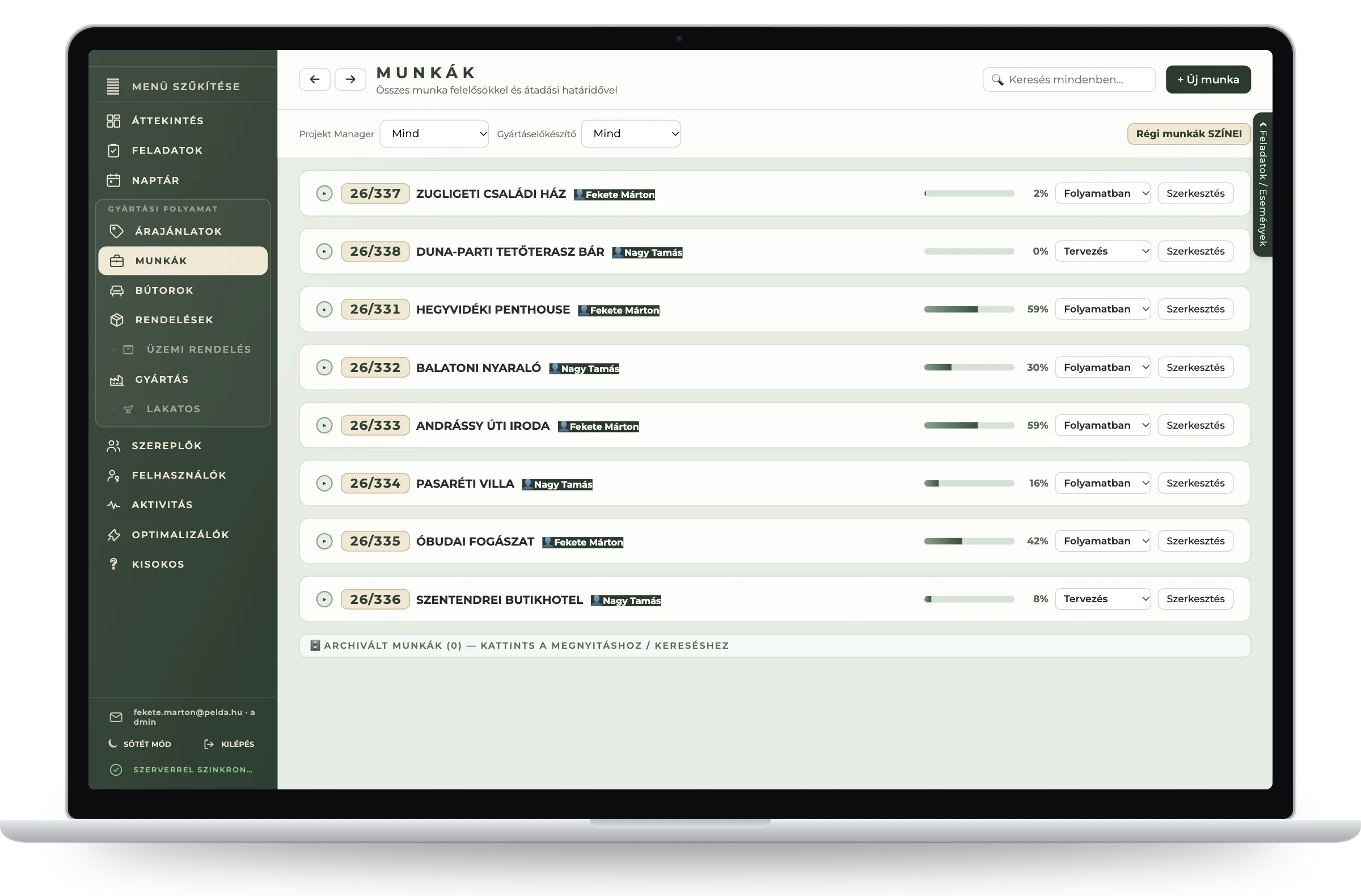
The overview page of the production management system on a laptop: a weekly calendar with installations and meetings, the overdue tasks list and the job schedule with progress. The production kanban on a laptop: furniture pieces in ready-for-production, phase one, phase two, ready-to-install and finished-goods columns, with the status of supplier phases. The job list of the production management system on a laptop: eight jobs with owner, progress bar and status.
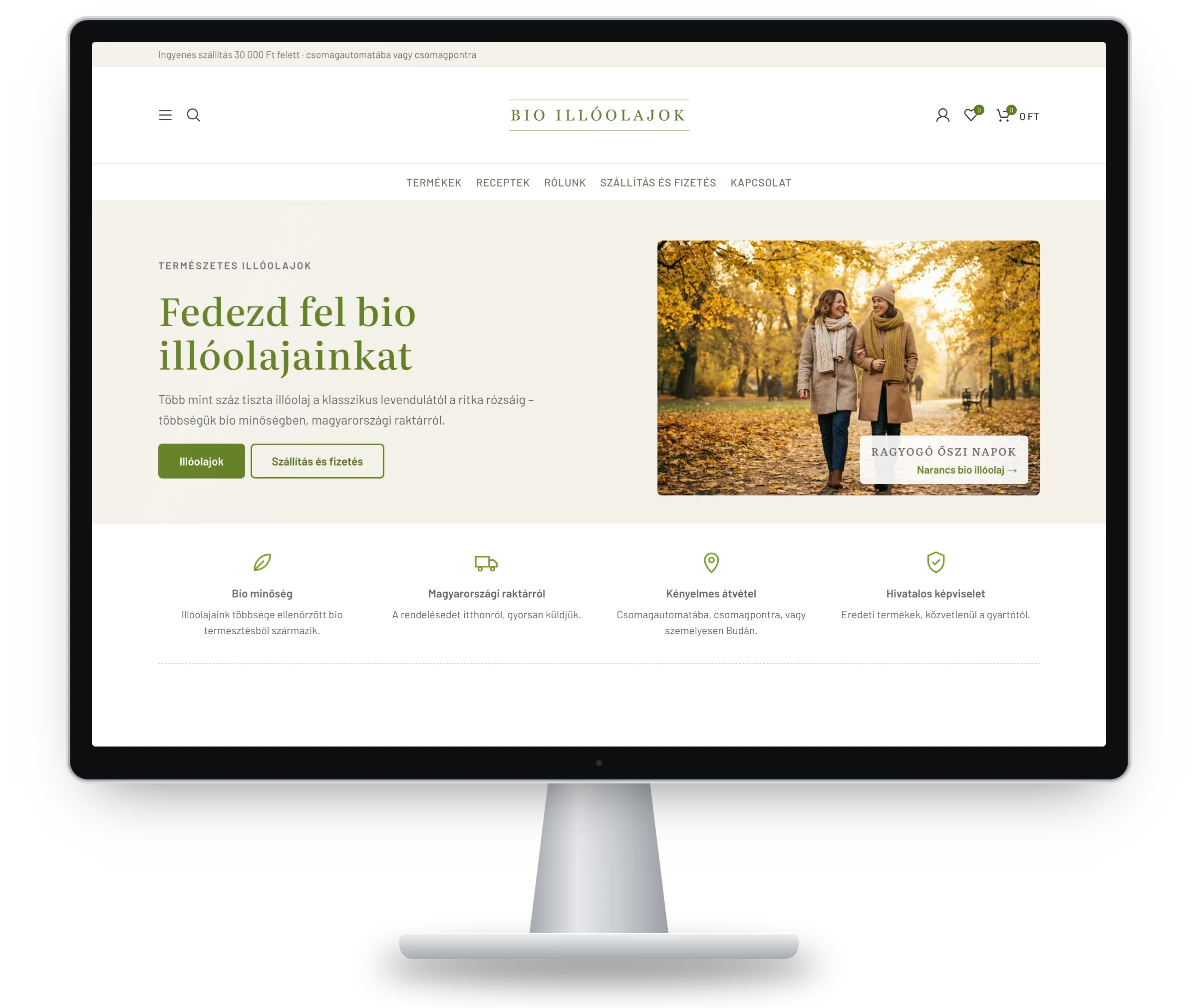
The home page of the essential oil shop on a desktop monitor: an autumn feature, quick links to essential oils and delivery information, and a row of benefits below.

Online shop for the Hungarian distributor of a natural cosmetics brand

More than 120 organic essential oils and natural cosmetics, shipped from a Hungarian warehouse, in line with the manufacturer's brand identity.

  • Product import from spreadsheets, with images and descriptions
  • Filtering by price, scent profile and mood, with recipes for the products
  • Card payments and automatic invoicing
  • Parcel lockers, pick-up points and in-person collection
  • Caching and fast loading, legal texts, go-live checklist
Client
Natural cosmetics distributor
Platform
WordPress, WooCommerce
Status
Pre-launch
Tools
MW-90 · MW-10

MW-30 product family

AI Department

Where the problem lives in e-mails, documents or repeated questions, artificial intelligence (AI) helps: chatbots, document processing, a company knowledge base, tailored to your data and processes.

MW-31 · Customer service assistant

Answering the same questions all day?

Answers customer questions on your website or online shop at any hour, based on your own product data, delivery and warranty terms. Anything it can't answer goes to a colleague.

For example“When will my parcel arrive?” “Do you have this shoe in size 9?”

MW-32 · Document processor

Typing invoices in by hand?

Reads the data from incoming invoices, delivery notes and contracts and enters it where it belongs: a spreadsheet, your business system or your accountant. Works from scanned PDFs and photos too.

For exampleHundreds of supplier invoices a month recorded without manual typing.

MW-33 · Company knowledge base

Does everything have to be explained in person?

Ask your own documents: policies, technical specifications, past quotes. Every answer comes with its source, so you can check it.

For example“What warranty did we give in last year's roofing quote?” Onboarding new colleagues through questions and answers.

MW-34 · Text factory

Spending days writing the same text?

Product descriptions, quote texts, information sheets and translations at scale, in your voice. A person always approves the final text.

For exampleFive hundred product descriptions in English and German, in a consistent style.

MW-35 · E-mail assistant

Drowning in e-mail?

Sorts incoming e-mail, drafts replies and extracts the details from quote requests so they go straight into your records.

For exampleQuote requests sent to info@ arranged in a table by morning, each with a ready reply draft.

MW-36 · AI assessment and training

Not sure where AI is worth using?

We look at where AI makes sense in your business and where it doesn't. Then we teach your team how to use it safely in their daily work.

For exampleA workshop for the office team: what ChatGPT or Claude are good for, and what data must never go into them.

AI Department operating rules

Safety regulations

  1. § 1.

    Your data stays yours.

    We only build in AI services that don't train on your data and whose data handling complies with the GDPR.

  2. § 2.

    A human beside the machine.

    Anything that moves money or goes out to a customer is approved by a person by default.

  3. § 3.

    No source, no answer.

    The assistant shows which document it used. Where it has no source, it refers you to a colleague.

  4. § 4.

    Measure first, automate second.

    We check how much time the task takes today. If AI doesn't save real time, we don't force it.

  5. § 5.

    Small-scale pilot.

    We start with one process and real data, and only expand once it has proven itself.

  6. § 6.

    The machine introduces itself.

    Your customers always know when they're talking to AI. The EU Artificial Intelligence Act requires it too.

Process sequence

How the repair works

Six stations from fault diagnosis to a process that runs itself. After each station you can see where things stand.

  1. 01Station 1

    Fault diagnosis

    We follow how an order, an invoice or a quote flows today and show you where it gets stuck.

  2. 02Station 2

    Blueprint and quote

    We put in writing what we automate first, how long it takes and what it costs.

  3. 03Station 3

    Pilot run

    We start on a single process with real data, so you quickly see what automation delivers.

  4. 04Station 4

    Step-by-step rollout

    We build on what works, with regular demos, so you always see where things stand.

  5. 05Station 5

    Quality control and commissioning

    Testing with real data, go-live, then training your team.

  6. 06Station 6

    Monitoring

    We watch that the automations actually run, and if something gets stuck, we know before you do.

The workshop

Straight from the maker.

No chain of project managers, no support queue. The person you talk to is the person who builds the system, so nothing gets lost in hand-offs and you never explain the same thing three times.

We work for small and medium-sized businesses, at their pace: quick decisions, clear quotes, and solutions your team can use confidently on their own after training.

The name works twice in Hungarian: MI is short for artificial intelligence, and “mi” means “we”, because we never hand your work on to anyone else.

Questions and answers

Frequently asked questions

What does process automation mean for a small or medium-sized business?

It means that repetitive, rule-based steps are done by a machine: recording an incoming order, issuing the invoice, sending reminders or compiling the weekly report. Your team can then focus on exceptions and decisions.

Do we need to buy new software?

Usually not. First we connect the tools you already use: invoicing, e-mail, spreadsheets, your online shop and accounting exports. We only suggest a new system if the existing one really gets in the way.

How much does automation cost?

It depends on the size of the problem, so we give you a written quote after fault diagnosis. With the counter on this page you can work out in advance what the manual work costs you now, and weigh the investment against it.

How long does it take?

We start with a pilot run on a single process, so the first results show quickly. The schedule for the full rollout is set out in writing in the blueprint.

Is AI safe to use with company data?

We only build in AI services that don't train on your data and whose data handling complies with the GDPR. Anything that moves money or goes out to a customer is approved by a person by default.

Does the time tracking meet legal requirements?

We configure the system to record the data required by the Hungarian Labour Code: regular and overtime hours, on-call time and leave. The details that apply to your business are agreed with your payroll provider or employment lawyer.

What size of business is it worth it for?

It pays off even for a business of a few people if a task eats up hours every week. The more often a step repeats, the faster automating it pays for itself.

What happens if an automation gets stuck?

Monitoring includes watching that your automations run. If something gets stuck, we get an alert and fix it.

Do you build online shops too?

Yes, but it's a side line for us. Our main focus is process automation, AI solutions, finance and HR systems, and custom business software. If your solution needs an online shop, we build that too, connected to invoicing, payments and shipping.

Form MW-K1 · Quote request

Get ahead of your competitors now.

Some of your competitors are already automating routine work and using artificial intelligence. If you don't, you'll fall behind.

Describe in a few sentences where work gets stuck. There's no obligation: it simply starts a conversation in which we show you what can be done.

MI Művek · Quote requestTakes about 2 minutes

Which area?

In the next step you can send it by e-mail. Read how we handle your data in our privacy notice.

Legal notice
Operator
Jágfalviné Békési Ágnes, sole proprietor
Registered address
Nádas u. 1, 2049 Diósd, Hungary
Registration number
62791869
Tax number
92362978-1-33
E-mail
info@mimuvek.hu
Hosting provider
Rackforest Zrt., Victor Hugo utca 11, 5th floor, B05001, 1132 Budapest, Hungary, info@rackforest.hu